
Transcription & Audio
Checking a SOAP note against what was actually said in the consultation.
The transcript and the audio recording exist for one purpose: to confirm that the SOAP note matches what actually happened in the room. This page covers how to use them while reviewing.
Why this matters
A SOAP note is the AI's interpretation of the conversation. The transcript is a record of that conversation, and the audio is the source. The three are layered:
| Layer | What it holds | What it is for |
|---|---|---|
| Audio | The original recording | The final reference when in doubt |
| Transcript | What was said, per speaker | A quick check without listening again |
| SOAP | The AI's structured summary | The clinical document you sign off |
When something in the SOAP note looks off, drop down a layer. That is the review path Medisa is built around.
Reading the transcript
Open a record, then select the Transcript tab.
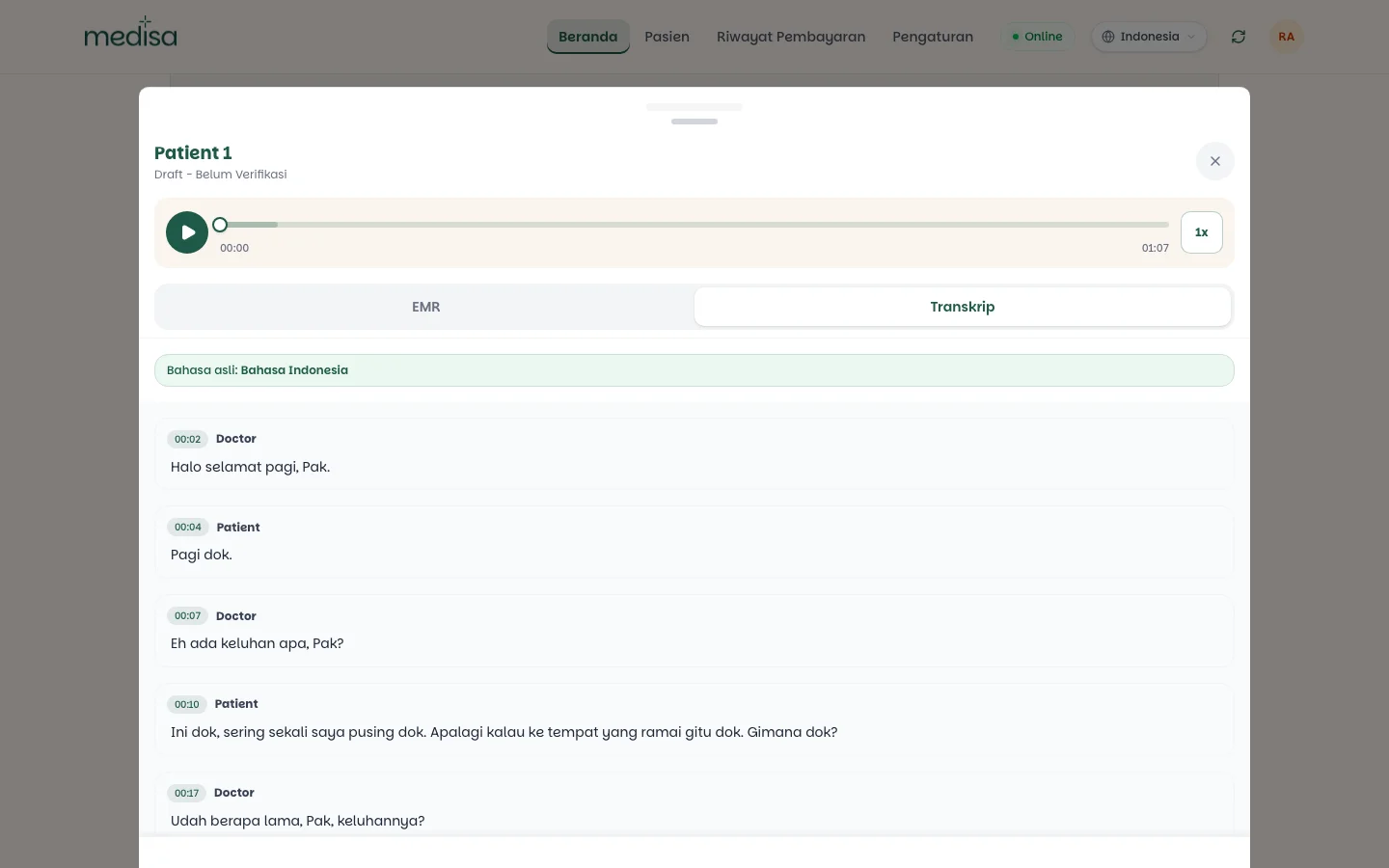
Two things make the transcript useful:
- Speaker labels —
DoctorandPatientare separated automatically, so a patient's complaint is never confused with the doctor's explanation. - Timestamps —
00:02,00:10and so on mark the position in the recording, so you know exactly which part of the audio to listen to.
The transcript is always in the original language
It is never translated, whatever interface language is active. That is what keeps it valid as a record of the conversation. See EMR Translation.
Listening back
The audio player sits at the top of the record detail, above the EMR and Transcript tabs.

The bar stays with the record on both tabs, so you can listen while reading either the SOAP note or the transcript without switching screens.
Press play to listen from the start, or drag the position marker to the part you want.
Use the transcript timestamps as your index. If a SOAP statement cites [s4], find that turn in the
transcript and jump to its time in the player.
Raise the playback speed with the 1x control when you only need to skim.
A review routine that works
Read the SOAP note through.
For each point that drives the diagnosis or the treatment plan, follow its citation into the transcript.
If the transcript itself is ambiguous — a clipped word, two drug names that sound alike — listen to the audio.
Correct the note if needed, then verify. See Editing an EMR.
Audio is not kept forever
Audio recordings are cleaned up automatically once they are no longer needed, while the transcript and SOAP note remain. If a case matters and might be questioned later, do the audio review now rather than months from now.
If something goes wrong
| Symptom | Most common cause |
|---|---|
| No audio player | The audio has been cleaned up, or the recording came from a failed upload |
| Audio will not play offline | The file is fetched from the server; it needs a connection |
| The transcript is empty | Processing has not finished, or the audio was silent |
| Speaker labels look swapped | Voices overlapped; use the audio as the reference |
| The transcript is not in the interface language | By design — the transcript follows the spoken language |