
Referral Partner
Joining as a partner, sharing your referral code, and receiving quarterly payouts.
The Referral Partner programme pays you a commission whenever a colleague you introduced subscribes to Medisa — not once at signup, but on every payment they make, for as long as their subscription runs.
It all lives under Settings → Referral programme.
Who it is for
Doctors already using Medisa who are in the right position to recommend it: colleagues at the same clinic, classmates, professional communities, alumni networks. There are no targets, no quotas, and no cost to join.
You need two things: a verified email address and a bank account that passes KYC. That account is where your commission is sent, so Medisa has to confirm it really belongs to you.
How the programme works
Joining as a partner
Make sure your email is verified.
Until it is, the referral page shows nothing but a prompt to finish that first. Verification happens under Settings → Profile.
Submit your bank details.
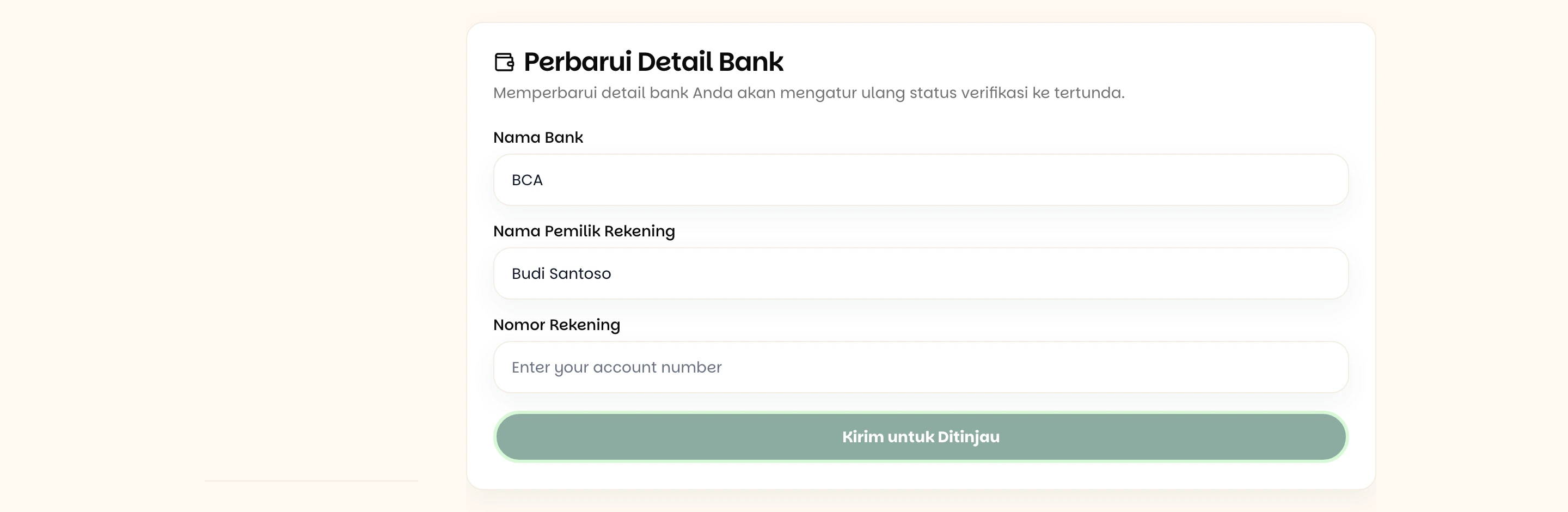
The account holder name should match your bank records exactly — a difference in spelling is the most common reason a submission is rejected.
Wait for the review. The status becomes Pending Review, and the Medisa team checks it within 1–3 working days.
The status becomes Verified.

Changing your bank details restarts verification
Saving new bank details returns your KYC status to Pending Review. You can still share your code during that time, but commission on payments that land meanwhile is not recorded. See If something goes wrong.
Your referral code
Once KYC is verified, press Generate Referral Code. The code is created once and does not change.
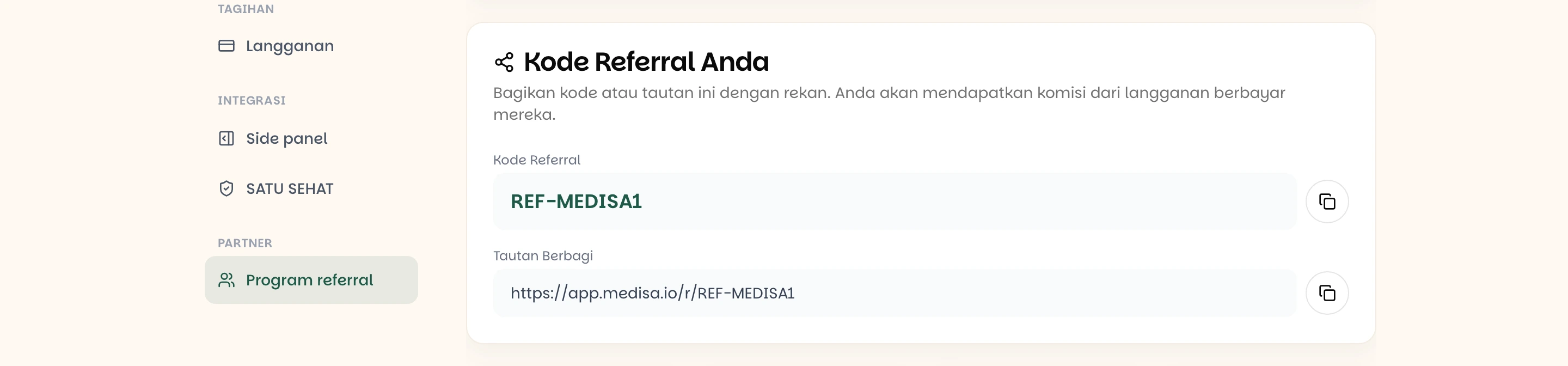
You get the same thing in two forms:
| Form | When to use it |
|---|---|
Referral code — REF-XXXXXX | Said out loud, written in a message, or typed by your colleague at checkout |
Share link — /r/REF-XXXXXX | Sent over WhatsApp, email, or a group — your colleague just taps it |
The share link is the better option. When a colleague opens it, the code attaches to their browser and stays for 30 days, so they have nothing to remember when they sign up later.
Your own code will not work on you
Entering your own referral code at checkout is rejected. The programme is for bringing other people in, not for discounting your own bill.
How commission is calculated
Three things determine the amount:
Your rate depends on how many conversions you have had. The current programme has two tiers:
| Conversion number | Rate |
|---|---|
| 1–25 | 7% |
| 26 and beyond | 5% |
The rate is locked per person, not per payment. Whatever rate applied when a colleague first subscribed keeps applying to every payment they make afterwards — even after your later conversions have moved to the lower rate.
Commission recurs. Every successful payment from that colleague creates its own commission record, monthly or annual, for as long as their subscription runs.
These rates can change
The tiers and rates above are the programme terms in force today, and Medisa sets them. What binds is the figure shown on your own referral page.
Reading the summary

| Card | What it means |
|---|---|
| Active Referrals | Colleagues whose subscription is still running. The figure beneath is those who have churned |
| All-Time Commission | Everything you have ever earned, paid or not |
| Current-quarter commission | Only what accrued this quarter, 2026-Q3 for example |
| Next Payout Estimate | Your pending balance, with the minimum payout threshold underneath |
Commission history

Each row is one payment: who paid, their plan, the billing period, the rate applied, the commission amount, and the quarter it was recorded in.
| Status | What it means |
|---|---|
Pending | Recorded, not yet part of a payout batch |
Paid | Included in one of the quarterly transfers |
Cancelled | Reversed — the underlying payment was refunded, for instance |
Getting paid
Commission is paid per quarter, not per transaction.

At the end of a quarter, every Pending commission is gathered into a single batch and transferred to your verified account. View details opens the breakdown of that batch — the invoice numbers and every commission line inside it, with the totals, so you can reconcile the amount that arrived yourself.
A balance under the minimum is not lost
If this quarter's balance has not reached the minimum threshold — currently Rp 500,000 — the payout is held and the balance carries into the next quarter. The commission stays yours; it is just waiting until there is enough to transfer.
If something goes wrong
| Symptom | Most common cause |
|---|---|
| The referral page only asks for email verification | The account email is unverified — finish it under Settings → Profile |
| No Generate Referral Code button | Your KYC status is not Verified yet |
| The KYC submission was rejected | The account holder name does not match the bank's records — correct it and resubmit |
| A colleague subscribed but no commission appeared | Your KYC was not verified at the moment of that payment — commission is only recorded for verified partners |
| A colleague forgot to enter the code | The code only attaches if they arrive through the share link or type it at checkout; it cannot be added after the payment |
| The referral code was rejected at checkout | Mistyped, or it is your own code |
| The quarter ended but no transfer arrived | The balance has not reached Rp 500,000 and carried into the next quarter |
A commission turned Cancelled | The underlying payment was reversed or refunded |
Related pages
- Subscription — where your colleague enters the referral code at checkout
- What is Medisa — the plans and prices you are recommending
- Authentication — verifying your account email