
Subscription
Reading your quota, choosing a plan through sales, and following the payment history.
A Medisa subscription is sold by recording hours per month and billed by invoice. There is no checkout inside the app: you pick a plan, the Medisa sales team sends an invoice, and the plan is activated once payment is received. This page covers how to read your remaining quota, choose a plan, and follow the history.
It all lives under Settings → Subscription.
Reading your plan
A compact version of the same card is always visible on the home screen too, as the Current Plan card below the patient list.

| What it shows | What it means |
|---|---|
| Current Plan | The plan currently in force |
| Status | Active, Inactive, or Paused |
| Ends on | End of the period; after this date the plan needs renewing |
| Billing | The cycle written in your contract — Monthly or Annual |
| Quota Usage | Minutes consumed out of this month's allowance |
Quota is measured by the duration of audio processed, not by the number of records. A 12-minute consultation costs 12 minutes of quota, however long the resulting SOAP note is.
Quota resets every month
Annual contracts included. What is invoiced up front for a year is the price, not the quota — the hour allowance is still counted and reset monthly, and unused quota does not roll over.
Queued plans
If sales has already scheduled a plan for the next period, View Your Plans shows the active plan along with its queue.
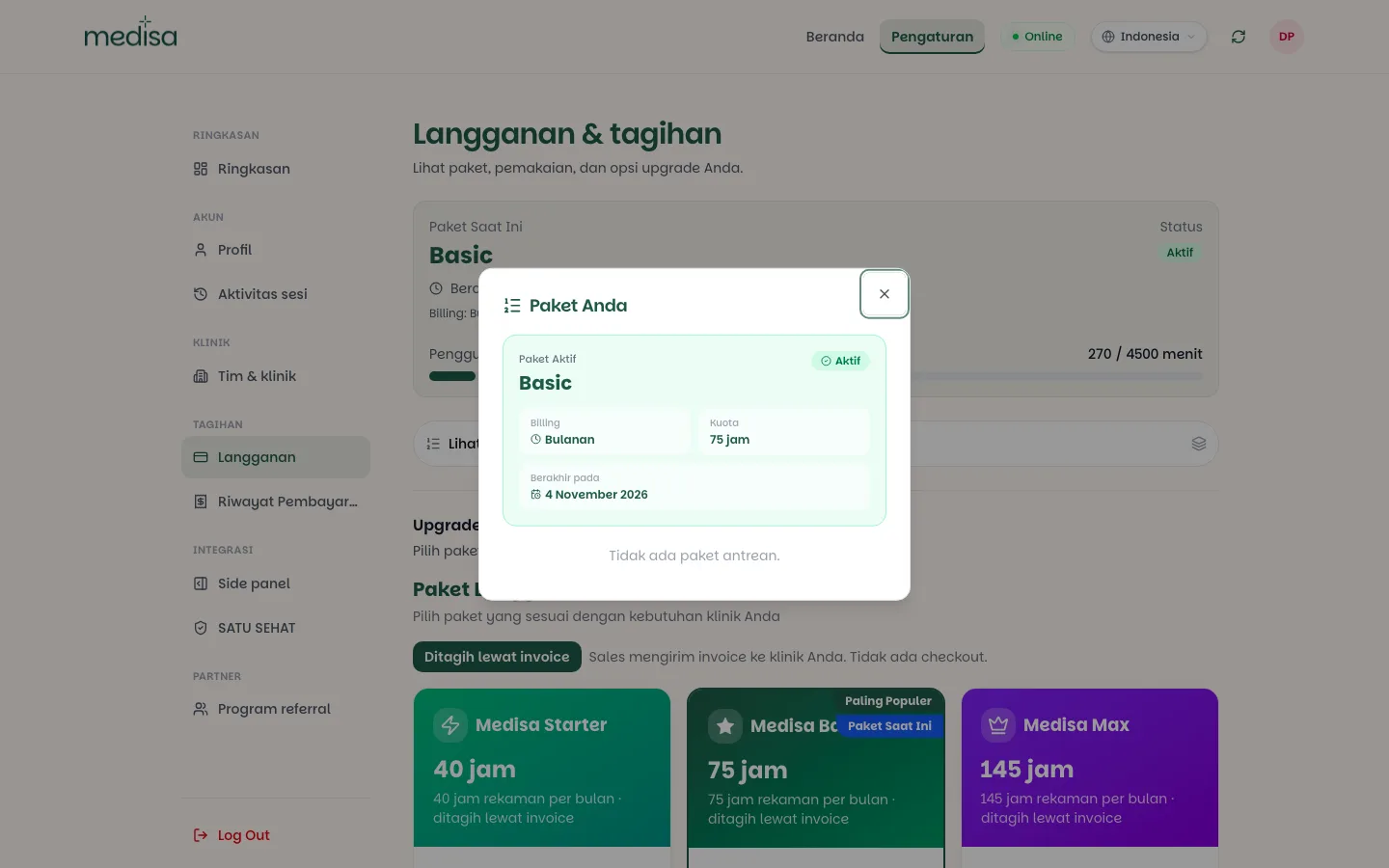
A plan marked Scheduled has not started — it takes over automatically when the current one ends.
Choosing a plan
The plan list sits under the summary card, in the Upgrade Plan section. Above it is a Billed by invoice label with the note: Sales sends an invoice to your clinic. There is no checkout.
Each card shows the plan name, its recording hours per month, and its feature list. Cards do not show a price, and there is no monthly/annual switch — both are settled in the contract with sales. The plan you are on is marked Current Plan and its button is disabled. Every other card carries a Contact sales button.
Press Contact sales on the plan card you want. The app opens a new email to sales@medisa.io
with the plan name already in the subject. State how many doctors, which cycle you want (monthly
or annual), and — if you have one — the referral code of the colleague who introduced you to Medisa.
Sales prepares a quote and sends an invoice to your clinic. The agreed price, cycle, and any discount are written on that invoice.
Once payment is received, the Medisa team activates the plan. The Current Plan card switches to the new plan with the end date from your contract, and the quota is available at once. Activation is done by a person, so it is not instant — expect working days, not minutes.
Prices are not shown in the app or here
Plan prices, currency, and discounts are set per country and per contract. The binding figures are the ones written on the invoice from sales.
Upgrading, downgrading, and renewing
All three go through sales — there is no upgrade, downgrade, or renew button in the app.
| Request | What happens |
|---|---|
| Upgrade | Once the invoice is paid, the new plan and its quota apply immediately |
| Downgrade | Sales schedules it for the next cycle; until then your plan is unchanged and the target appears as a Scheduled plan |
| Renewal | Contact sales before the Ends on date; a reminder is also emailed ahead of it |
Payment history
Open Settings → Payment History to see every subscription transaction, including invoice payments recorded by the Medisa team. This menu is no longer in the top navigation bar.
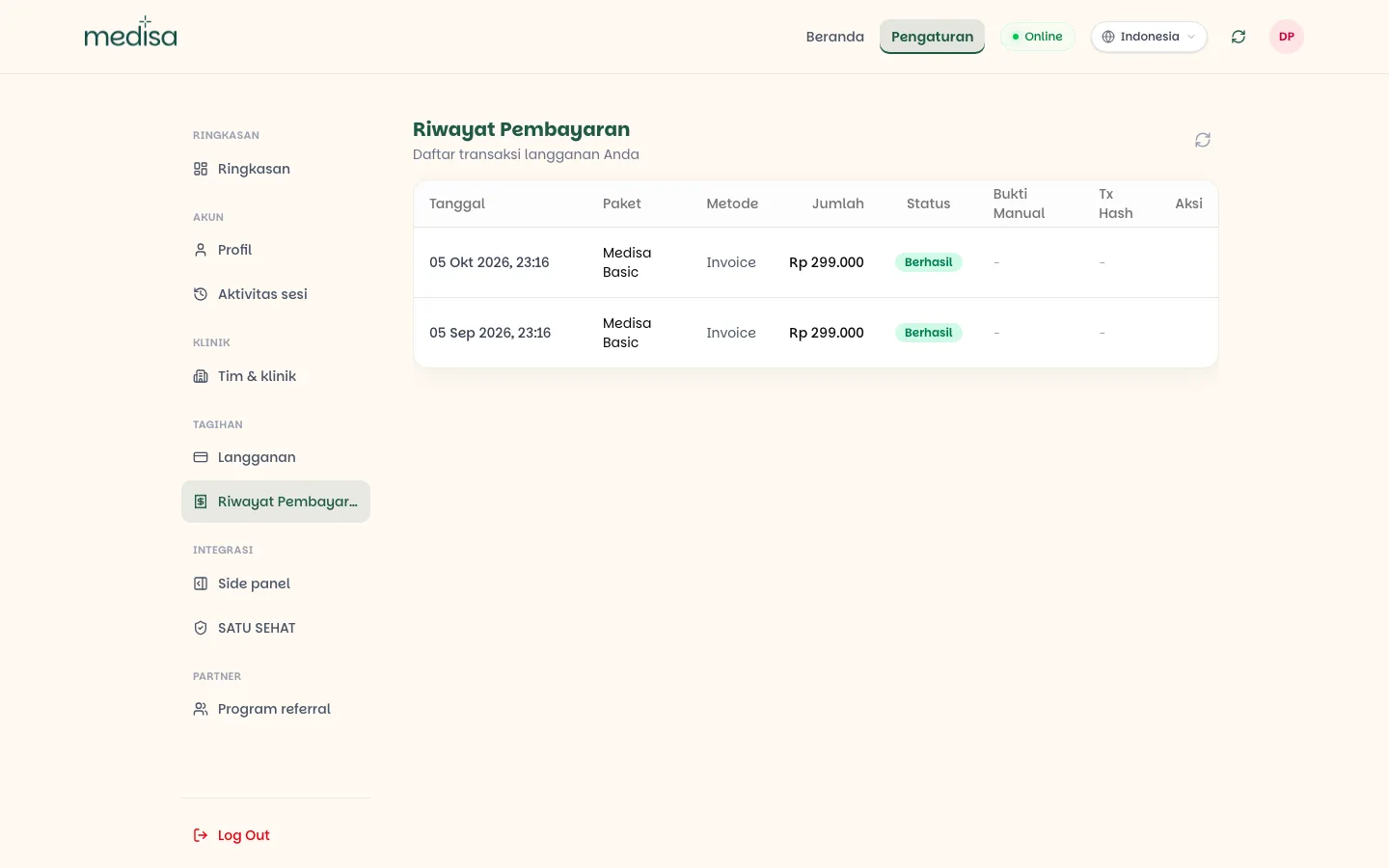
| Column | What it holds |
|---|---|
| Method | Invoice for payments through sales; BCA, BNI, CIMB, or Xendit for older gateway transactions |
| Amount | The figure in your contract's currency, for example IDR, SGD, or MYR |
| Status | Successful, Pending, Failed, or Expired |
| Manual Proof | Older gateway transactions only — the state of a transfer receipt you uploaded |
| Tx Hash | A link to the transaction's blockchain record, available once the payment is settled |
Invoice rows are recorded as Successful straight away, because they are created after payment is received. The Check and Pay buttons appear only on older gateway transactions that are still Pending.
When the quota runs low
The app warns you in stages:
- Quota almost used up — an early warning as you approach the limit.
- Quota exhausted — new recordings cannot start until the plan is raised through sales or the quota resets next month.
- Plan no longer active — the contract period ended without a renewal.
Renewal reminders are also emailed before the period ends.
Your records stay safe
An exhausted quota or an expired plan only stops new recordings. Existing records, transcripts, and SOAP notes remain open and readable.
If you hold a clinic seat
While you hold an active seat in a clinic, your personal subscription is Paused: its remaining days are held and do not tick down, and your usage is drawn from the clinic seat's quota.
The personal plan resumes automatically once you leave that clinic, with the same number of days it had when it was paused. See Adding Organization Seats.
If something goes wrong
| Symptom | Most common cause |
|---|---|
| Invoice paid but the plan has not changed | Activation is done manually by the Medisa team after the payment is recorded — reply to your invoice email if more than two working days have passed |
| Contact sales opens nothing | Your device has no default email app; email sales@medisa.io manually |
| The plan list is empty | No plans are available for your country yet; contact sales@medisa.io for a quote |
| Still on the old plan after asking for a downgrade | By design — a downgrade applies from the next cycle |
Plan status is Paused | You are using a clinic seat; the personal subscription is held meanwhile |
| Cannot record despite an active plan | This month's quota is used up; wait for the reset or raise the plan through sales |
Related pages
- What is Medisa — the institutional routes and the referral programme
- Adding Organization Seats
- Referral Programme — how a referral code is recorded on a contract